fm1-midi-processor
FM-1 MIDI Processor
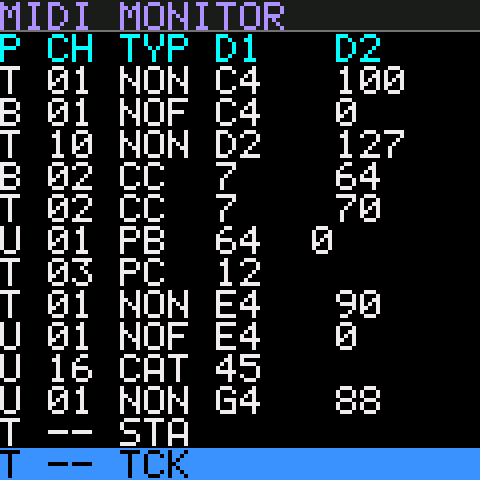
Custom firmware that turns the M-VAVE FM-1 into a stand-alone MIDI processor: monitor, filter, remap, re-channelize and trigger MIDI without a computer.
- Help guide: how every page and control works, with screen captures.
- Flash the firmware: install it from desktop Chrome or Edge over USB. No software to install.
Firmware
Latest version: 0.1.0 (build a8c8fd4918ca4038, 2026-11-03 12:40 UTC)
- FM1-MidiProc.fwsc: the compiled firmware package, 459,316 bytes, for use with your own flasher.
- SHA-256:
b75f2630e1462a3e4f512c59021cef7bd547c5daafa41e4a62f80cde20a35039 - Update identity
FM-1_8000014, FM1 Open SDK family 7. Details in manifest.json.
What it does
MIDI from TRS MIDI IN and USB passes through a pipeline and comes out of USB MIDI OUT:

- MIDI Monitor: a scrolling list of the last 100 messages. Colours show what the pipeline did: passed, blocked, remapped or triggered.
- Search with OP1–OP5 by port, channel, type and data ranges.
- Shortcuts turn the selected message into a rule or trigger.
- Filters: per port, pass or block each channel and each message type. Channel messages are set per channel.
- Remaps:
- Message rules change note, CC or program numbers and set the output channel.
- Channel rules move a port’s channel to another channel.
- Rule Builder (GLO): build a remap rule by taking its input from one message and its output from another. Each can come from the monitor, the keys or the knobs.
- Event Triggers: an incoming message, or a range of values, sends a list of other messages, such as bank select and program changes for a whole rig.
- Knobs: KNOB 1–4 send a CC each, on the channel and CC number you choose, from any page.
- Live Keys: the FM-1’s keys play notes with random velocity, and send program and bank changes.
- MIDI clock:
- One input owns the clock, so clocks are never merged.
- A metronome click plays on the headphone output, with its volume on MASTER.
- The Clock Monitor shows the source, run state, BPM and elapsed time.
- Patches: 16 named patches.
- Every setting can be dumped and loaded over SysEx, for backup and editing on a computer.
MIDI Connections
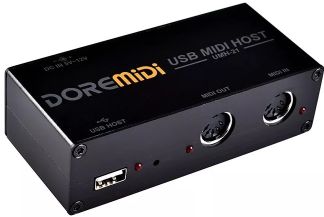
The DoReMidi USB MIDI Host Box can be used to provide DIN MIDI in/out ports for the FM-1. With the USB Host Box, you have 2 inputs (1 DIN and 1 TRS) and 1 DIN output. The USB Host Box will also power the FM-1.
[!NOTE] MIDI from the host box’s DIN input reaches the FM-1 over USB. So on the FM-1 it appears as the USB port (U in the monitor).
Repository
| Folder | Contents |
|---|---|
src/ |
Firmware, built on the FM1 Open SDK |
tools/ |
USB flasher (fm1_flash.py), patch SysEx tool, screen designer, site builder, tests |
design/ |
Screen designs, design decisions, patch and SysEx format |
html/ |
The help site and flash page, published with GitHub Pages |
To build the firmware, you need the JieLi PI32 toolchain. Run:
set FM1_PI32_TOOLCHAIN=C:\JL\pi32
python tools\fm1_flash.py --build
fm1_flash.py --build builds the firmware and flashes it to a connected FM-1.
FM-1 MIDI Processor is unofficial firmware. It isn’t made or supported by M-VAVE. Use it at your own risk.